


A good CRM shouldn't just keep the customer's history. Ideally, it should also tell the sales rep what's worth doing next: Call the customer? Send a follow-up on the quote? Suggest a reorder? Or, conversely, do nothing because the signal is too weak?
In 2026, we can talk about Next Best Action in HubSpot, Microsoft Dynamics 365, Salesforce, Zoho CRM, and Pipedrive. They offer different forms of this approach, which we discuss right after clarifying what an ideal NBA means.
Information verified on September 6, 2026; beta/preview features and licensing terms may change.
1. The Ideal Next Best Action System Depends on the Data You Have Available
There is a huge difference between: "the next action based on CRM information" and "the next commercial action based on the customer's entire situation".
The second variant may also require ERP orders/products, stock, margin, or credit limits. In that scenario, the CRM remains the interface where the rep works, but the decision may be computed elsewhere.
In the OPTI guide on Next Best Action from June 2026 we proposed the ideal NBA architecture: commercial data > AI > company rules > CRM > human feedback. In the guide, a recommendation shown to the user must answer four questions:
| Question | Example |
|---|---|
| What do I need to do? | Call the customer for a reorder |
| Why now? | 38 days have passed since the last order, and the usual cadence is 35-45 days |
| What should I propose? | Product A and complementary product B |
| What limits do I need to respect? | Maximum 5% discount, no extension of payment terms |
Not every lead scoring is Next Best Action: a score of 82/100 tells you where to look, not what to do. In B2B, you may have a customer with a high score whom you can no longer sell to if they have reached their credit limit and this information is not included in the score.
Three Ways to Implement NBA in a CRM Like HubSpot
Option 1: Native NBA / Guided Selling Features in the CRM
In this case, the recommendation engine and the main logic run in the CRM platform, including its own AI functionalities. This is the right option for new leads that need to be contacted, deals with no activity, meetings that require follow-up, and other activities kept natively in the CRM.
The advantage is fast activation with low integration effort.
Extension of Option 1: The Company's Own Data Synced into the CRM
If you only have a few pieces of information to pull in from outside, they can be synced as properties in the CRM. For example, in HubSpot you can have custom properties, which you then use in workflows, calculated properties, lists, and other entities.
The advantage is medium-difficulty integration and keeping the NBA logic in the CRM.
See case study: How we synced 750,000 emails from Freshsales into HubSpot
Option 2 (Hybrid): The CRM as an Interface for an External Decision Engine
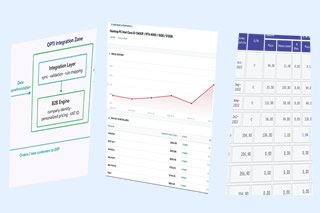
Used when the recommendation depends on company logic spread across several external systems (ERP, CRM, WMS, e-commerce, contracts, etc). In this case, a data warehouse such as BigQuery aggregates the data, and the CRM displays the recommendation received from the external engine that controls the process, including the AI functions.
The advantage is full control and centralization of the company's data.
2. What Native NBA Features Does HubSpot Have?
HubSpot now uses the concept of AI Guided Selling and describes Suggested Tasks as "next-best actions" based on buying signals. In the Sales Workspace, the rep receives an analysis of current deals (deal insights), daily tips, and meeting preparation recommendations. The Guided Selling features are included in Sales Hub Professional and Enterprise. (Source: HubSpot)
AI-Suggested Tasks: The Closest Feature to Native NBA
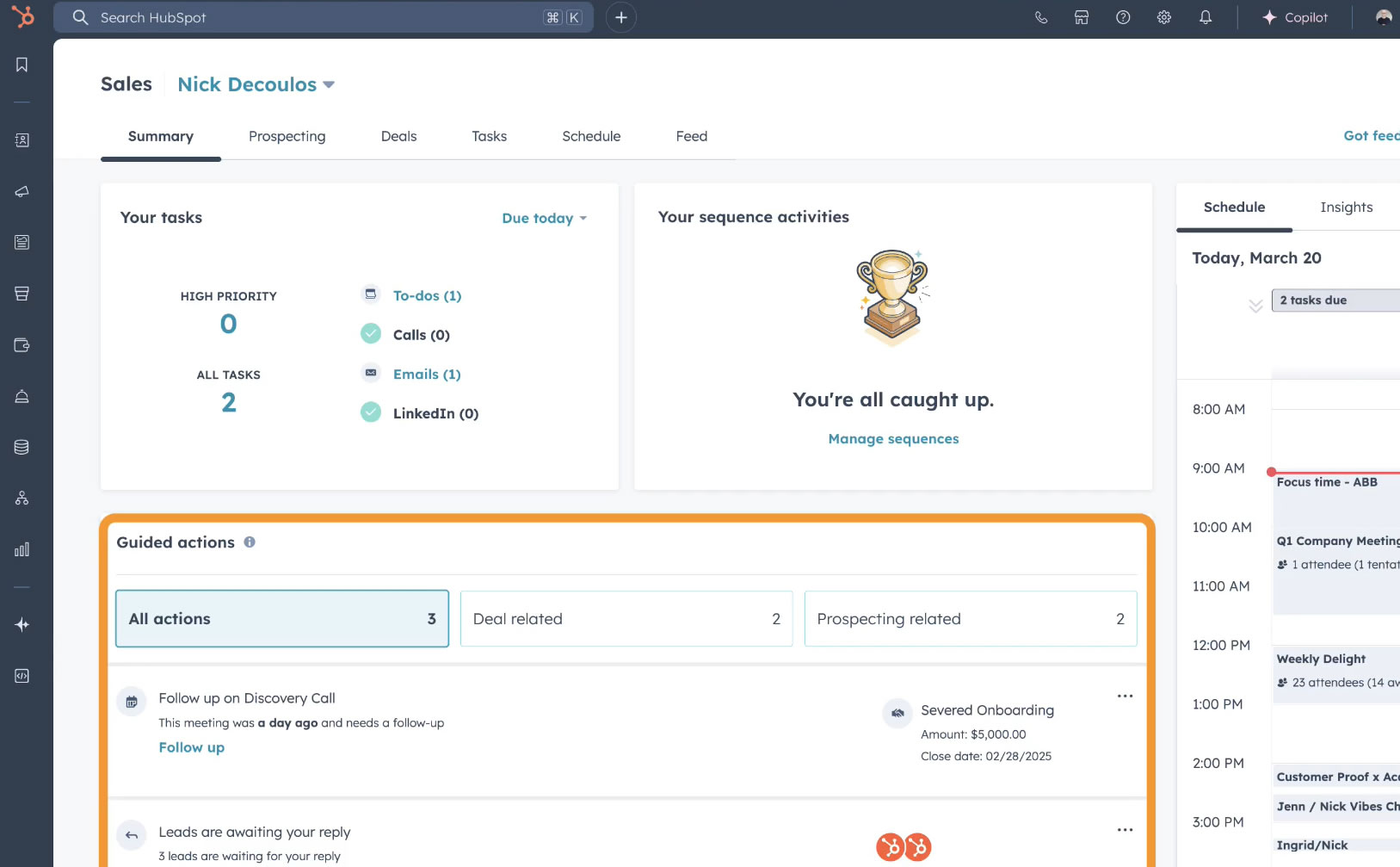
In the new Sales Workspace available since April 2026, there is a Suggested Tasks card with recommended actions based on recent activity, meant to show the rep where to focus, which continues the Guided Actions experience.
Deal Scores: Prioritizing the Sales That Matter
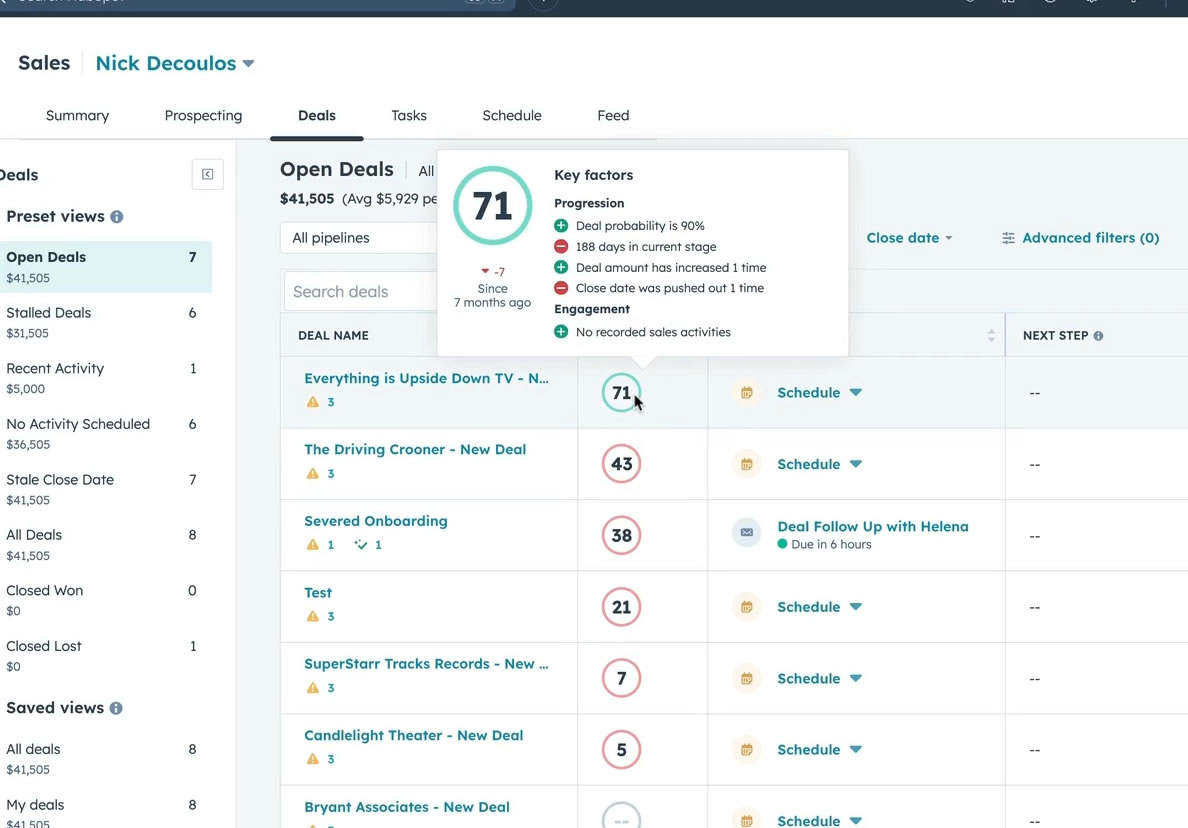
HubSpot uses AI to calculate the win probability of deals. The model uses data such as rep activity, meetings, and buyer emails. The deal stage is treated as ground truth: if the company has classified a deal as lost or won, the score will no longer be updated. HubSpot also warns that the score is informative and should not be the only criterion for decisions. (Source: HubSpot Knowledge Base)
Smart Deal Progression: NBA After Meetings
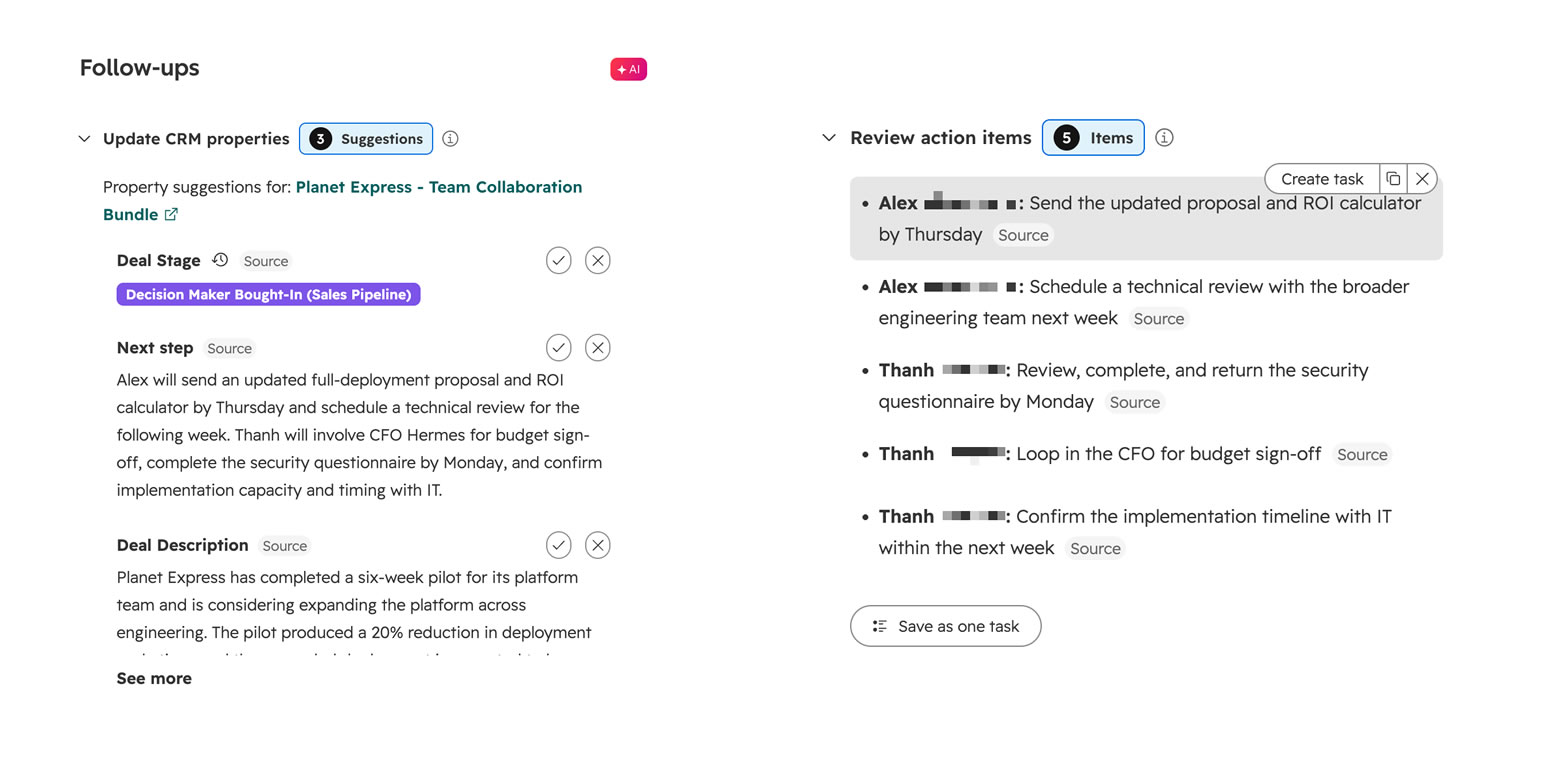
Another feature close to NBA is Smart Deal Progression, in beta at the time of writing this guide. HubSpot analyzes the transcript of a meeting or a call together with the deal in the CRM and suggests actions at the end. These include CRM updates, and for meetings, tasks and follow-ups, but the user can approve or reject them. Note that HubSpot Notetaker cannot be used for calls where protected health information (PHI) appears (Source: HubSpot Knowledge Base)
So AI extracts the possible actions from the conversation: "X was discussed, so Y needs to be done."
Workflows: Deterministic NBA
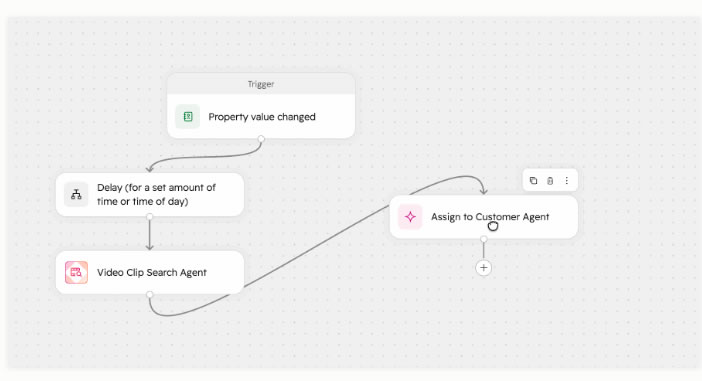
There is also a classic solution that shouldn't be overlooked: a smartly built HubSpot workflow, without using AI. For example, if the rule is based on clear thresholds (tiers):
"Deal with no activity > 7 days + value > EUR 50,000 + stage = Proposal sent" MEANS "create a task for the rep"
You can further combine these rules with the new agents in HubSpot Agent Hub (beta) to add details to the task (for example, a summary of the target company). Agentic features may require HubSpot Credits.
See case study: how we built an application that sends SMS from HubSpot workflows
What Do You Need to Set Up NBA in HubSpot?
For processes based on CRM data, you configure Guided Selling, workflows, and the necessary properties. If the recommendation depends on ERP, stock, margin, or contracts, you need an external integration.
3. Dynamics 365 vs. Pipedrive vs. Zoho vs. Salesforce
HubSpot's competitors don't use the same terminology, so a comparison based solely on whether the term "Next Best Action" is used would be misleading. We present them step by step: what features they offer and where you can customize the flows.
Microsoft Dynamics 365 Has Had a Feature Called "Next Best Action" Since 2026
For a long time, Dynamics 365 already had two mechanisms close to NBA:
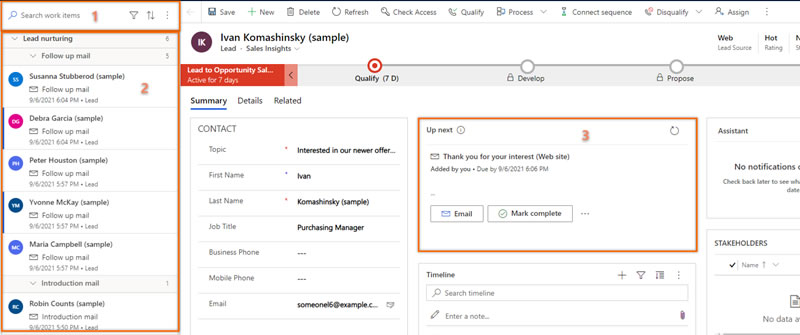
- Assistant (formerly "Relationship Assistant") monitors activities and communications and displays actionable insight cards. Organizations can also build custom cards through Power Automate. (Source: Microsoft Learn)
- Sales Accelerator provides an intelligent work list that helps the rep reach the next relevant lead or opportunity, if sequences are configured to be suggested. (Source: Microsoft Learn)
In 2026, Microsoft even introduced the name Next Best Action as a feature, currently in preview with a partial rollout. The new direction aggregates the actions produced by Microsoft sales agents such as the Sales Qualification Agent, custom agents, and workflows. These are prioritized, including with an explanation of urgency or importance. Microsoft will provide deep integration, by executing the action directly from Dynamics 365, Microsoft 365, or Outlook. (Source: Microsoft Learn).
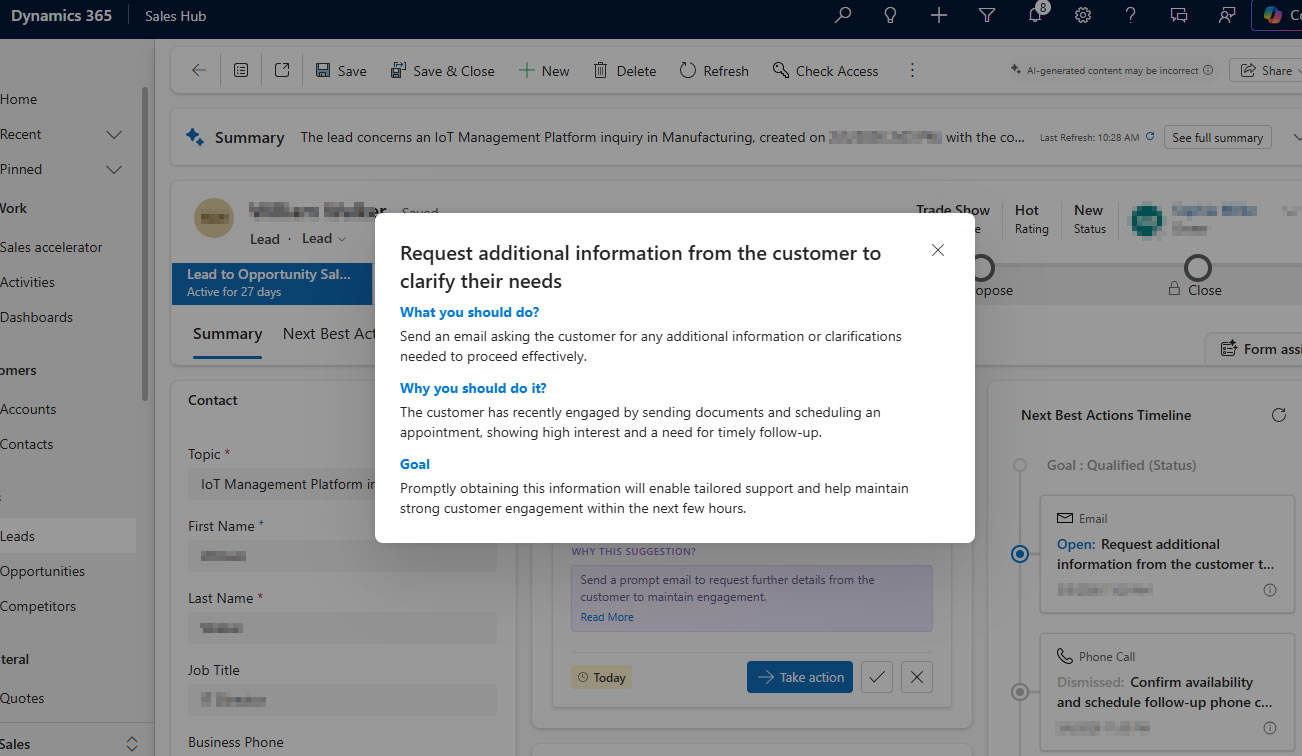
What Do You Need to Set Up NBA in Dynamics 365?
In 2026, Dynamics allows configuring agents and automations that generate Next Best Actions. For complex scenarios, the relevant external data sources also need to be connected. At the time of writing, some components are still in preview or rollout.
Pipedrive: Prioritization Recommendations with a Simpler Architecture
AI features are now present in Pipedrive as well. AI Sales Assistant can estimate the win probability of a deal and can recommend "next best actions" to increase its chances. The AI assistant also identifies deals with no activity or opportunities worth attention, along with winning patterns and blockers that appear in the sales pipeline. (Source: Pipedrive)
It's the most direct option for an organization that wants: "Show me where to focus today."
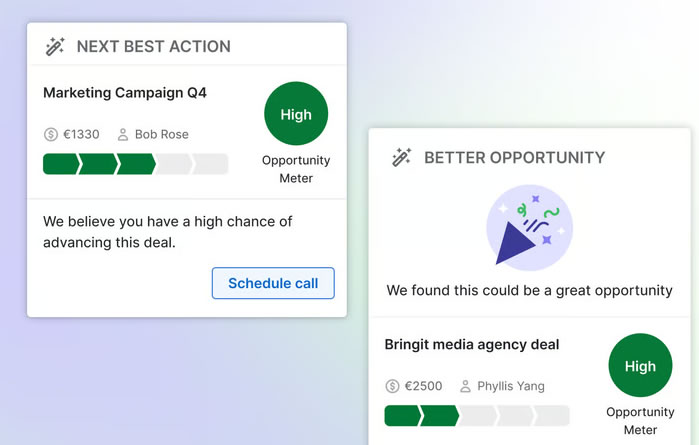
What Do You Need to Set Up NBA in Pipedrive?
Pipedrive is suited for relatively simple prioritization and recommendations. For decisions based on stock, margin, contracts, or other systems, you need to add external integration.
Zoho CRM: Full NBA Cards
Zoho has one of the clearest native NBA implementations, called Zia Next Best Experience (NBX). NBX analyzes lead engagement, deal stage history, interactions, and customer behavior, and displays a widget called "Next best action" directly on the Lead, Contact, or Deal. (Source: Zoho)
The recommendation includes:
- the proposed action
- a button to execute the action
- the explanation
- similar deals and their outcomes
- preparation for a specific activity: an email draft, a meeting agenda, or call preparation (as in HubSpot)
- Like / Dislike for feedback and continuous learning
Zoho organizes NBX around three goals: Lead Nurturing, Customer Retention, and Pipeline Optimization, following a predictive AI tradition of letting the customer optimize the overall goal.
This gives you the ideal NBA card: action + explanation + execution + feedback.
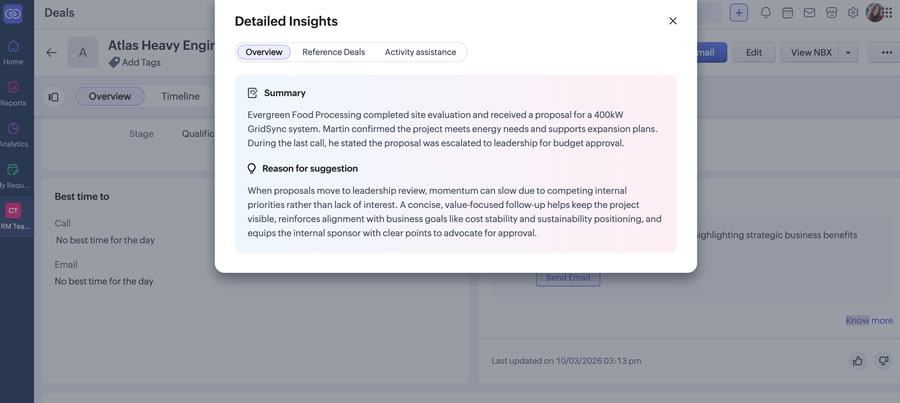
What Do You Need to Set Up NBA in Zoho?
Zoho already provides the NBA card through Zia Next Best Experience. For more complex B2B recommendations, external data needs to be integrated into the logic used by the CRM.
Salesforce: Maximum Configurability for NBA Flows
Salesforce goes beyond the functionality of an in-house AI that recommends actions based on the company's data in the system. Einstein Next Best Action is a complex, configurable recommendation framework of its own. So, recommendations can be Salesforce objects, can also be generated dynamically, and a strategy (Recommendation Strategy) decides which offers or actions reach the user. It uses business logic, predictive models, and other data sources, making integration easier.
The recommendations are then displayed in a Next Best Action component that can be built similarly to the ones above, which can then be accepted or rejected by the end rep. Accepting or rejecting can trigger a Flow that updates data, sends an email, or triggers other processes. (Source: Salesforce)
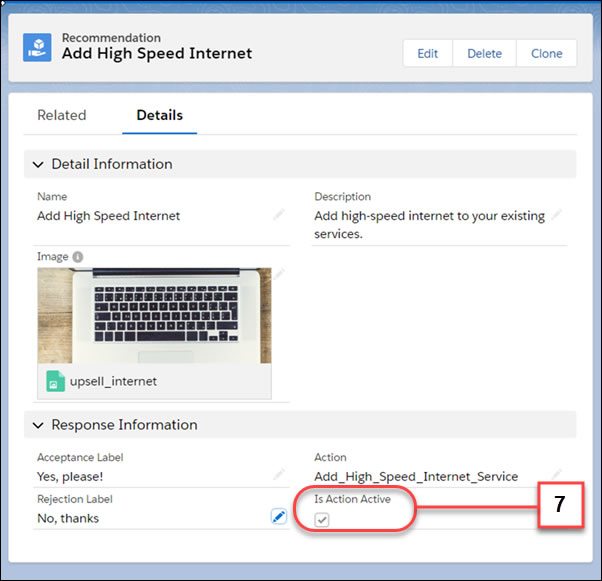
In 2026, Salesforce recommends building new NBA strategies in Flow Builder, and the June documentation explicitly covers migration from the old Strategy Builder. For scenarios with many products, Salesforce even allows dynamically generating recommendations "on the fly," for example one upsell recommendation per different product, which offers maximum flexibility. (Source: Salesforce)
What Do You Need to Set Up NBA in Salesforce?
Salesforce allows advanced configuration of NBA strategies through Flow Builder and Einstein Next Best Action. Implementation is more complex, but it can include almost any logic and data source of the company.
4. Comparison: Why Choose Each CRM and What the Hybrid Option Means
Each CRM has its own advantages, but for clarity we centralize here what may attract you to each of them when you want an NBA system.
NBA Comparison: HubSpot, Dynamics 365, Pipedrive, Zoho, Salesforce
| CRM - Relevant Features | Advantages and Benefits | How Well Suited for B2B? |
|---|---|---|
| HubSpot - AI Guided Selling, Suggested Tasks, Smart Deal Progression, Deal Scores | Prioritization, engagement, fast follow-ups, very good meeting/deal context | Good, needs integration when the decision depends on ERP |
| Dynamics 365 - Assistant, Sales Accelerator, Next Best Action 2026 | Prioritization, context, and agents are advantages, as is execution within the Microsoft ecosystem (e.g. Outlook) | Good, especially for the new agentic direction, with configurable data sources |
| Pipedrive - AI Sales Assistant | Excellent for probability, prioritization, simple recommendations | Medium, very practical but less oriented towards managing the company's own policies |
| Zoho - Zia Next Best Experience | Excellent at action + reason + similar examples + preparation + feedback | Good for data held in the CRM, needs integration when the decision depends on ERP |
| Salesforce - Einstein Next Best Action + Flow Builder | strategy, rules, recommendations, execution | Good and highly configurable, supports almost any company logic together with the data |
The Hybrid Option: The Company Defines Its Own Commercial Recommendation Engine and Displays the Cards in the CRM.
Here is a detailed look at the architecture of the hybrid solution, in which
- BigQuery, as the data warehouse, gathers data from ERP / WMS / CRM (HubSpot),
- The AI functions can run in BigQuery or in other layers up to the Cloud Run application that controls the company's logic.
- The final card is injected into the CRM with the data decided by the system
- The rep uses the card in the CRM. In HubSpot, the recommendation can be displayed as a React-based App Card through UI Extensions.
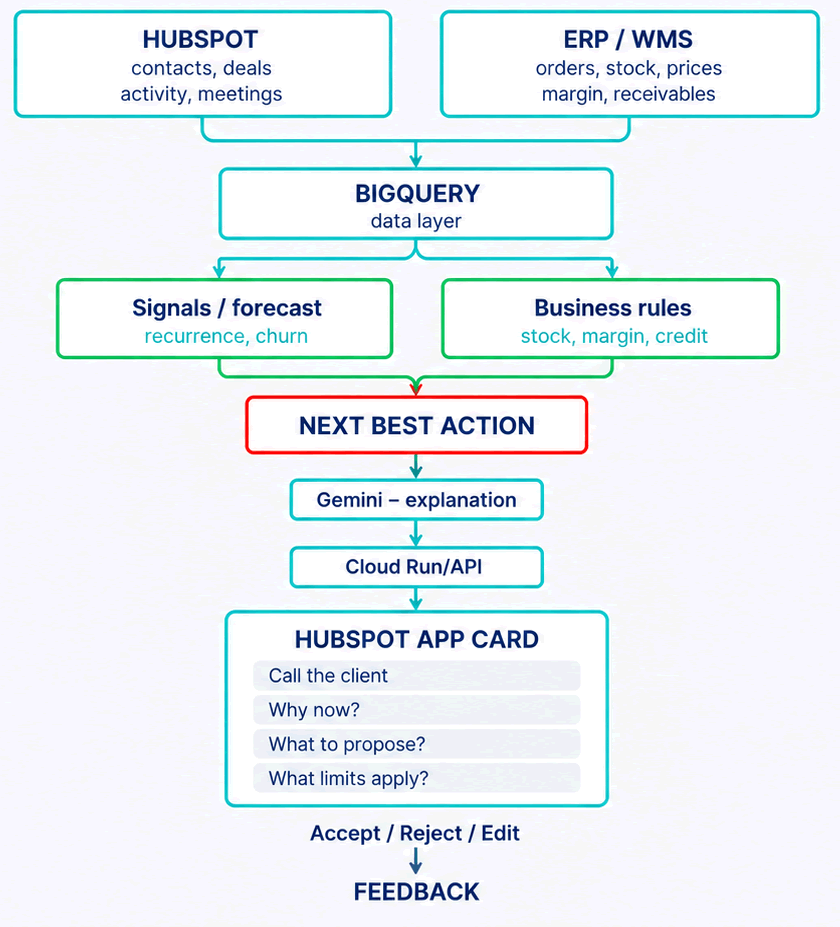
NBA doesn't require training your own model. In BigQuery, a simple recurrence can be calculated directly through SQL. For time series better suited to forecasting, Google Cloud also offers AI.FORECAST, which uses the built-in TimesFM model and can produce forecasts without creating and maintaining a separate model. (Source: Google Cloud)
In addition, for a customer who orders almost always every 30-35 days, a classic deterministic algorithm may be enough, as in the HubSpot workflow example above. In addition, stock, margin, and credit rules are worth keeping deterministic, as we noted in the previous article: AI proposes. Commercial rules decide what reaches the rep.
Looking for Google Cloud and Gemini Enterprise Agent Platform integrations?
How Do I Choose Between Systems and Options?
| Criterion | Native NBA in the CRM | Hybrid: Cloud + CRM |
|---|---|---|
| Time to launch | Low | Medium |
| ERP / WMS / contract data | Needs integration | Excellent |
| Own commercial rules | From medium to very good, depending on the CRM | High control |
| AI model | The CRM's model | High control |
| UX for the rep | Excellent (shown in the CRM) | Excellent (shown in the CRM) |
| Accept/Reject feedback, explainability, and audit | Depends on the CRM | Full control |
| Initial cost and maintenance | Low | Medium |
| Vendor lock-in | To the CRM platform | Depends on the architecture |
| When to use? | CRM processes or simple logic | Complex B2B processes and many data sources |
For a pilot, the initial cost tends to favor already-licensed CRM features. As the number of data sources and company rules grows, the hybrid solution offers more control.
For any implementation, you can also define a useful list of KPIs. Don't measure the success of the project by "the number of recommendations generated," but by profitability:
| KPI | What It Measures |
|---|---|
| Acceptance rate | how many NBAs are considered useful by human reps |
| Conversion rate / uplift | how many NBAs turn into an action/order, and what the difference is compared to baseline |
| Influenced revenue | revenue associated with NBAs |
| Time to action | how quickly the rep reacts to a new NBA |
| Commercial rule violations | how many pre-contractual or contractual issues occurred |
In general, a system that generates 5 alerts and gets 3 actions that lead to a sale is more useful than one that generates 50 alerts and gets one such action. Quality beats quantity.
A low-cost pilot can follow these steps:
- Already-licensed CRM features: In HubSpot, Suggested Tasks, Guided Selling, Deal Scores, meeting follow-up, and Smart Deal Progression can already handle part of the desired task.
- Workflows and custom properties: If only a few pieces of information are missing, an integrator needs to sync them and use the automations and AI agents in the CRM.
- An external engine when needed: Justified when more data sources, rules, or specific AI models are required. Or when the data volume is better kept outside the CRM.
This way, the project's complexity only grows once the strategy points to the necessary business goal.
Why OPTI?
OPTI combines HubSpot implementation and integration with Google Cloud application and infrastructure development. OPTI is a HubSpot Solution Partner and a Google Cloud Partner and works under ISO 9001 and ISO 27001 certifications.
A project can start by configuring the CRM's native features and later evolve towards integrating hybrid components, without replacing the systems the company already works with.